SCENE 02 · SERVICE DESIGN CASE STUDY · 2026

LinkLog — follow-up workflow for social prescribing teams

Helping Link Workers turn scattered follow-up records into usable client context and dashboard-readable data.

ROLE
UX Designer / Prototype Designer
Workflow mapping, prototype logic, data structure, and demo storytelling.
TIMELINE
2-week sprint + prototype refinement
Team service-design sprint followed by portfolio-ready refinement.
PARTNER
OACAO / Links2Wellbeing
Social-prescribing follow-up workflow for Link Workers and SALCs.
FOCUS
Follow-up workflow, context, data continuity
Priority queue, client context, interaction logging, and CSV migration.
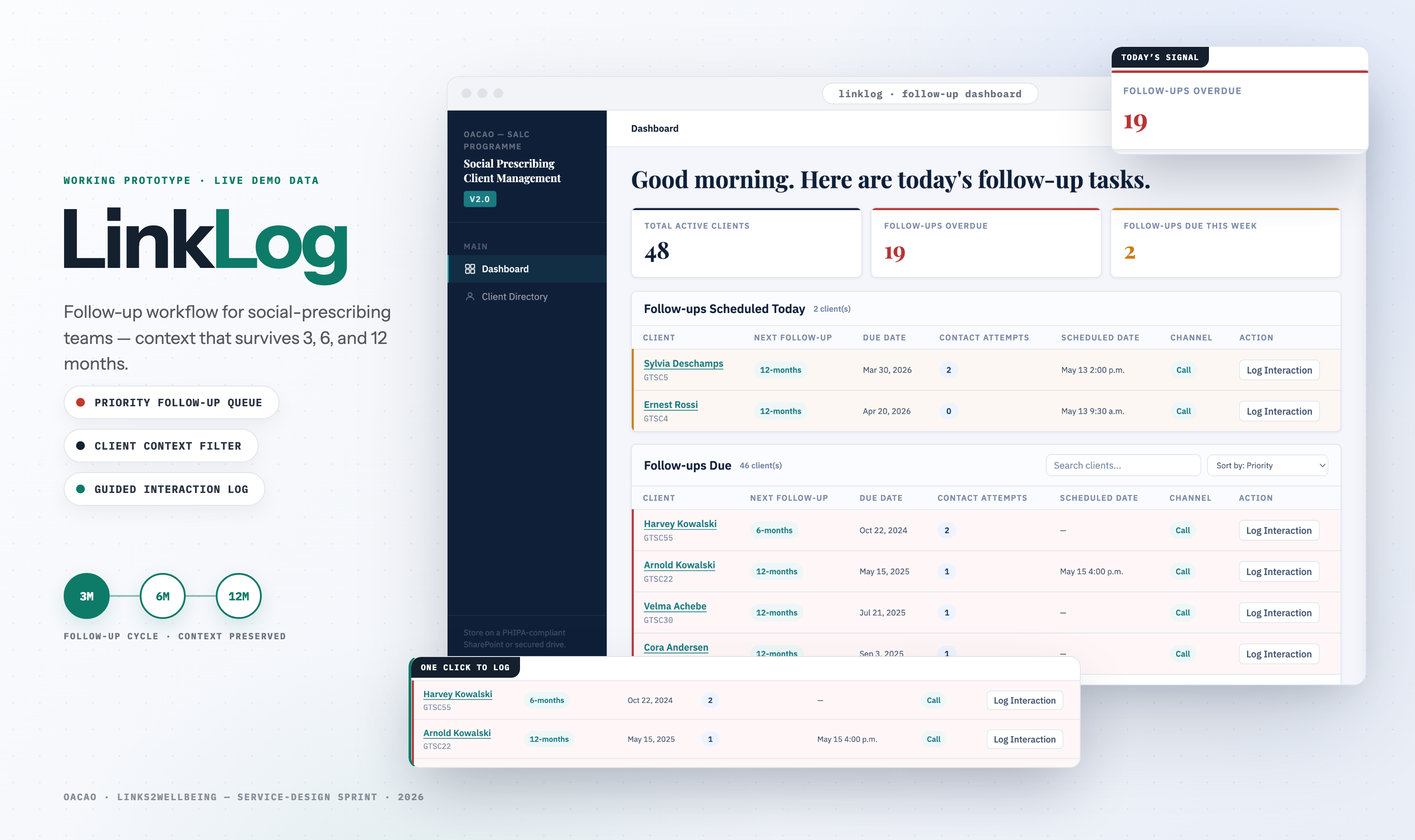
LinkLog product hero showing dashboard and client context screens

OPENING FRAME — LinkLog reframed as a service workflow, not only a dashboard.

Demo Video · Produced by Boyi Tan

Showing the follow-up workflow as a service story.

I made this video to explain how LinkLog fits into a Link Worker’s day: reviewing priority, preparing client context, documenting the conversation, and preserving follow-up history.

OPENING PROBLEM · FOLLOW-UP CONTEXT BREAKS DOWN
Problem

Context was scattered.

Client details and follow-up records could live across spreadsheets, paper forms, phone notes, staff notes, SurveyMonkey, and worker memory.

Need

Follow-up had to survive time.

Link Workers needed to know who was due for 3-, 6-, and 12-month follow-ups, what happened last time, and what mattered before the next call.

Reframe

The challenge was continuity.

The work shifted from building a static dashboard to preserving client context across follow-up moments and staff handoffs.

Takeaway: Link Workers did not simply need another place to enter data. They needed a way to preserve the narrative context behind follow-ups while still producing structured information for reporting.

MY CONTRIBUTION · WHAT I OWNED

I turned the service idea into a working prototype story.

In a team sprint, I focused on the bridge between workflow, data, prototype behavior, and demo communication.

Input
Team sprint
Shared blueprint, concept direction, and service story.
01 · Context filter

Usable profile context

Barriers, preferences, programs, notes, and history — surfaced when they matter.

02 · Data structure

Dashboard-readable CSV

Sample records and interaction logs organized into stable fields.

03 · Prototype logic

Behavior, not mockups

Field mapping, status display, context filtering, demo-ready interactions.

04 · Demo storytelling

The service story on film

A video walkthrough framing LinkLog inside a Link Worker’s real day.

Output
Working prototype story
Live demo with sample data, plus a produced video walkthrough.
THE CAST · PEOPLE BEHIND SOCIAL PRESCRIBING
Program partner
OACAO
Runs Links2Wellbeing and needs reporting it can trust.
Local delivery
SALC staff
Centre staff and volunteers delivering the service locally.
The users
Link Workers
Prepare, call, document, and maintain relationships over time.
LINKLOG SUPPORTS THIS ROLE
The people served
Older adults
Represented only through simulated or anonymized prototype data.
← CONTEXT, RECORDS & REPORTING FLOW BACK THROUGH LINKLOG

This project was designed for the people behind social prescribing. It was not a direct app for older adults; it was a backstage workflow for the staff who keep follow-up, context, and reporting connected.

ACT I · MAP THE CURRENT SERVICE

What the current state revealed

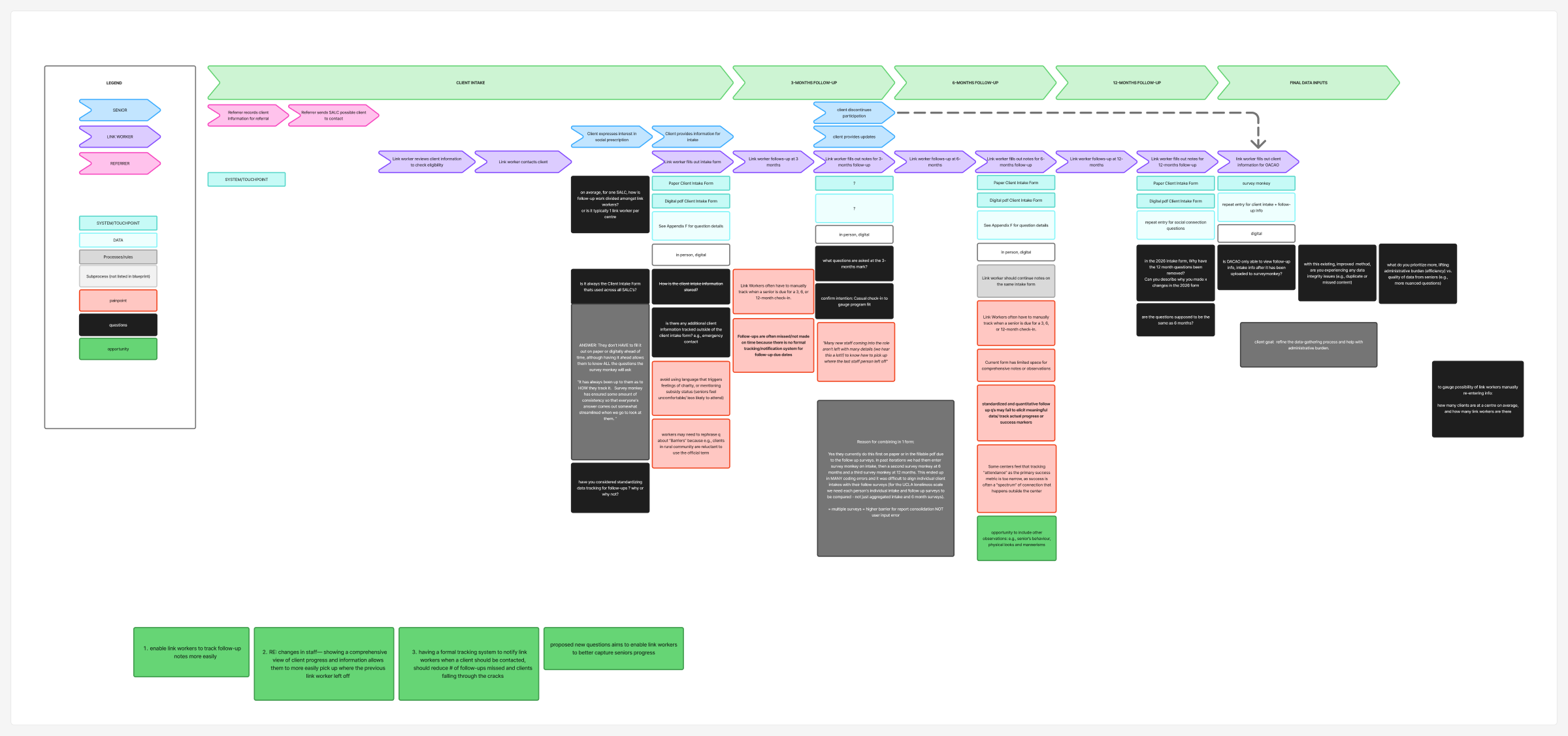
The blueprint helped us see that follow-up was not just a reminder problem. It was a continuity problem across notes, staff memory, reporting tools, and client context.

3 / 6 / 12 month follow-ups notes reporting SurveyMonkey SALC data flow pain points
Current service blueprint excerpt for LinkLog follow-up workflow

EVIDENCE 01 — Cropped current service blueprint, focused on follow-up lanes, data touchpoints, and continuity gaps.

Insight 01

Follow-ups are both safety net and motivation.

They help prevent clients from dropping through cracks, while also encouraging continued participation.

Insight 02

Excel is the wrong container for narrative notes.

Spreadsheet rows can preserve fields, but they do not make rich client context easy to find before a call.

Insight 03

Attendance alone is too narrow.

Success in social prescribing can include social connection, confidence, routine, and qualitative progress.

Synthesis Cut

The problem was not more fields. It was usable context.

Current-state synthesis helped separate scattered data from usable follow-up context. That distinction shaped the prototype priorities: priority queue, profile context, structured logging, and data migration.

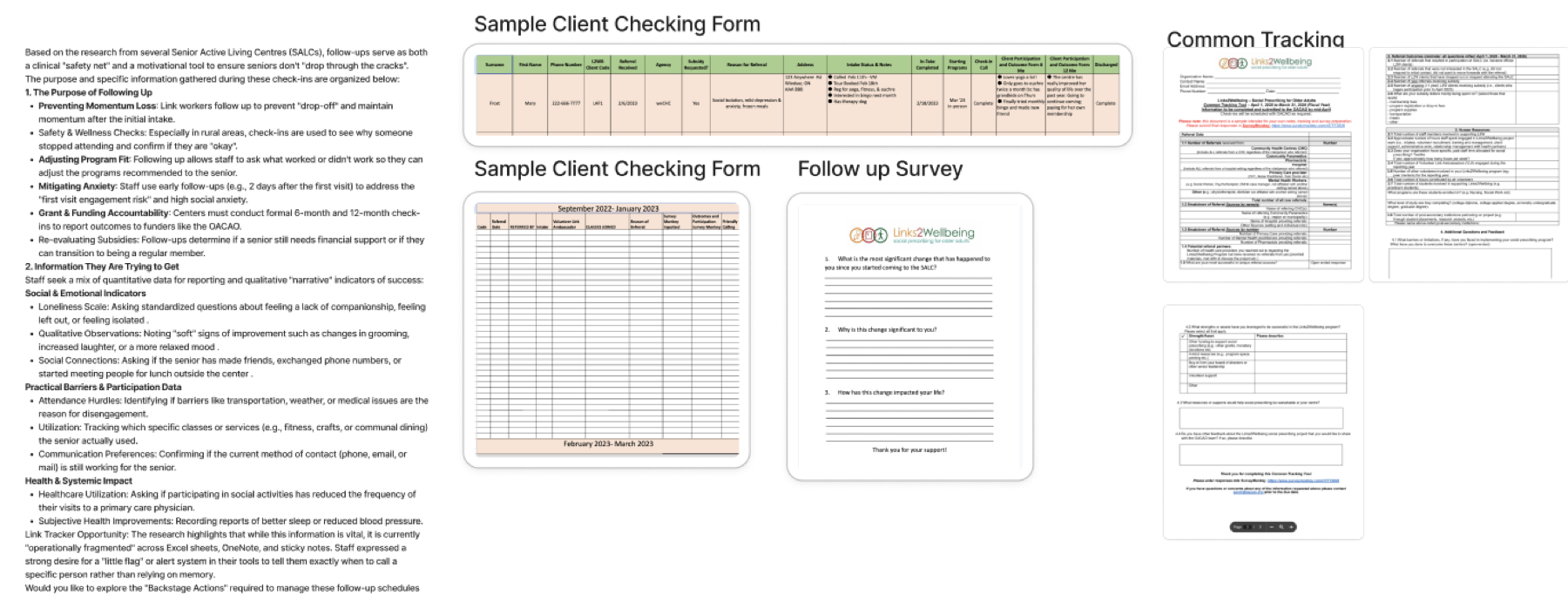
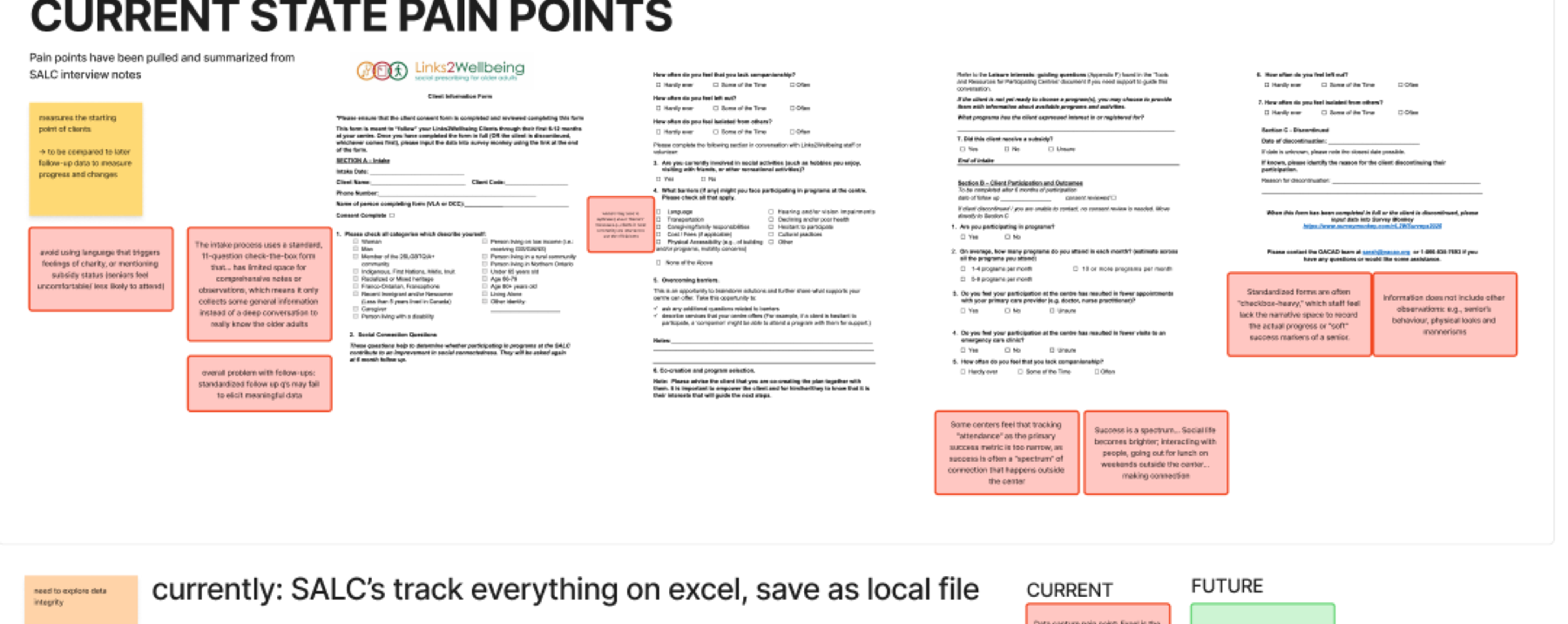
Cropped evidence showing current LinkLog source forms, sample checking forms, follow-up survey, and tracking materials
SOURCE MATERIALS — forms, spreadsheets, survey questions, and tracking artifacts that carried follow-up information.
Cropped current-state pain point synthesis showing forms annotated with sticky note insights
PAIN-POINT SYNTHESIS — notes from existing forms translated into gaps around narrative context, timing, and follow-up meaning.
ACT II · REFRAME THE DESIGN DIRECTION

The future workflow reframed LinkLog as follow-up support, not a static dashboard.

The service needed to help Link Workers know who to contact, understand why, document what happened, and preserve that history for future follow-ups and reporting.

PREPARE · BEFORE THE CALL
01Reviewpriority list
02Openclient profile
03Reviewcontext
LINKLOG SURFACE · PRIORITY DASHBOARD + CONTEXT FILTER
CONNECT · DURING THE CALL
04Contactclient
05Loginteraction
LINKLOG SURFACE · INTERACTION LOG
PRESERVE · AFTER THE CALL
06Updatejourney
07Preservehistory
LINKLOG SURFACE · TIMELINE + REPORTING
↻ PRESERVED HISTORY FEEDS THE NEXT 3 / 6 / 12-MONTH FOLLOW-UP CYCLE

SIMPLIFIED FUTURE WORKFLOW — built from the future blueprint and demo flow, grouped into the three moments of a follow-up day.

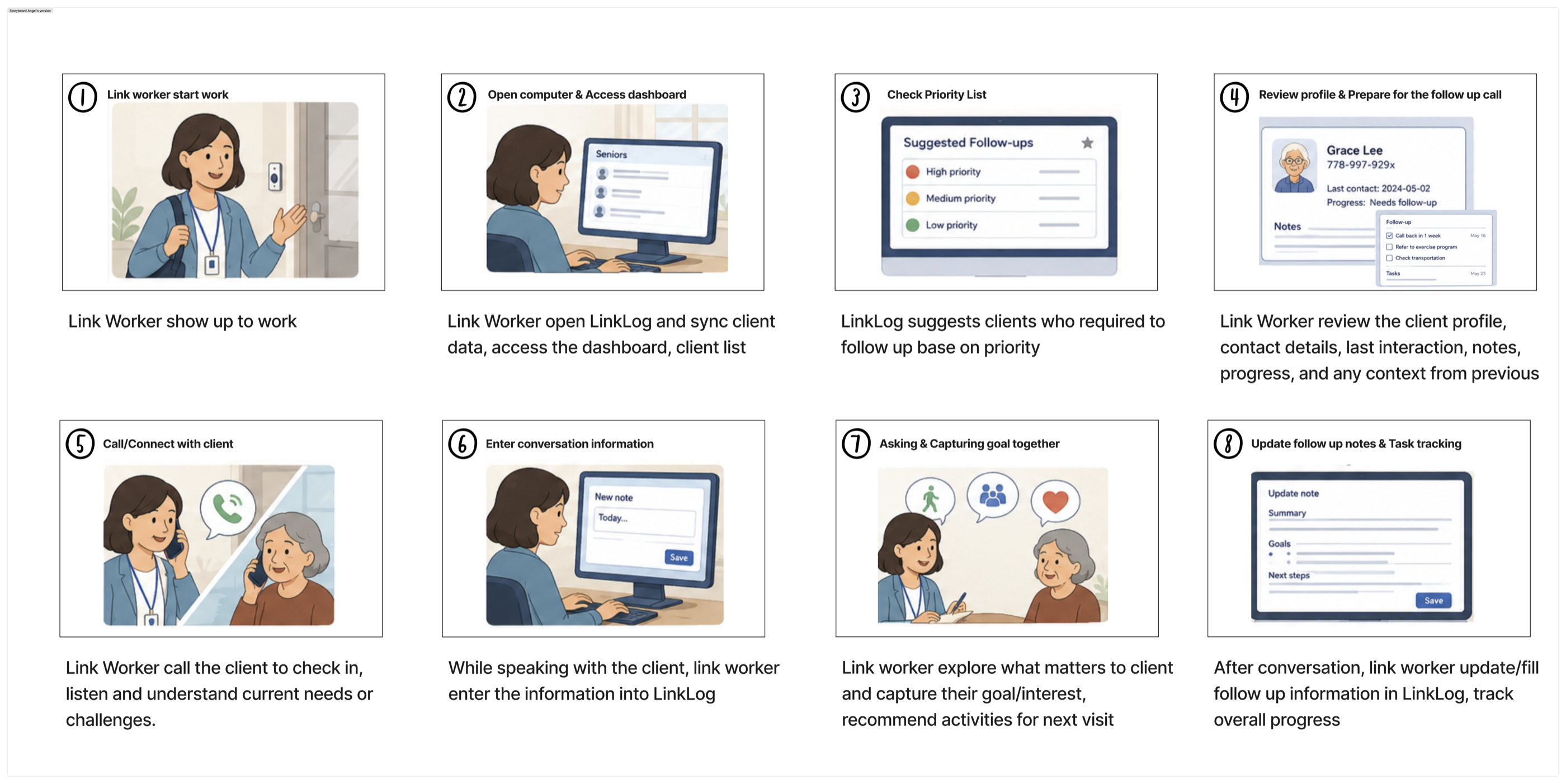
Final Portfolio Storyboard

The final story follows a Link Worker from start-of-day preparation to updated follow-up notes.

This 8-step storyboard is the portfolio-facing communication artifact: it shows how LinkLog fits into the service day, from opening the dashboard and checking priority to reviewing context, calling the client, documenting the conversation, and updating progress.

Process note: earlier sketch boards and workflow thumbnails helped us test the order of the story, but they are supporting evidence rather than the main artifact.

Final eight-panel LinkLog storyboard showing the Link Worker workflow from start of work through follow-up notes and task tracking
FINAL STORYBOARD — 8-step service story used to communicate the future LinkLog workflow before the working prototype.
ACT III · PROTOTYPE THE WORKFLOW

Four solution highlights kept the prototype grounded in service work.

The dashboard is one touchpoint. The larger system connects priority, context, documentation, and migration from existing records.

Highlight 01 — Priority Dashboard

The queue answers who needs attention first.

Problem: Link Workers need to know who requires attention without searching across fragmented records.
Decision: Dashboard shows follow-up priority, overdue status, due windows, and client status.
Why it matters: Workers can start from a clear follow-up queue.
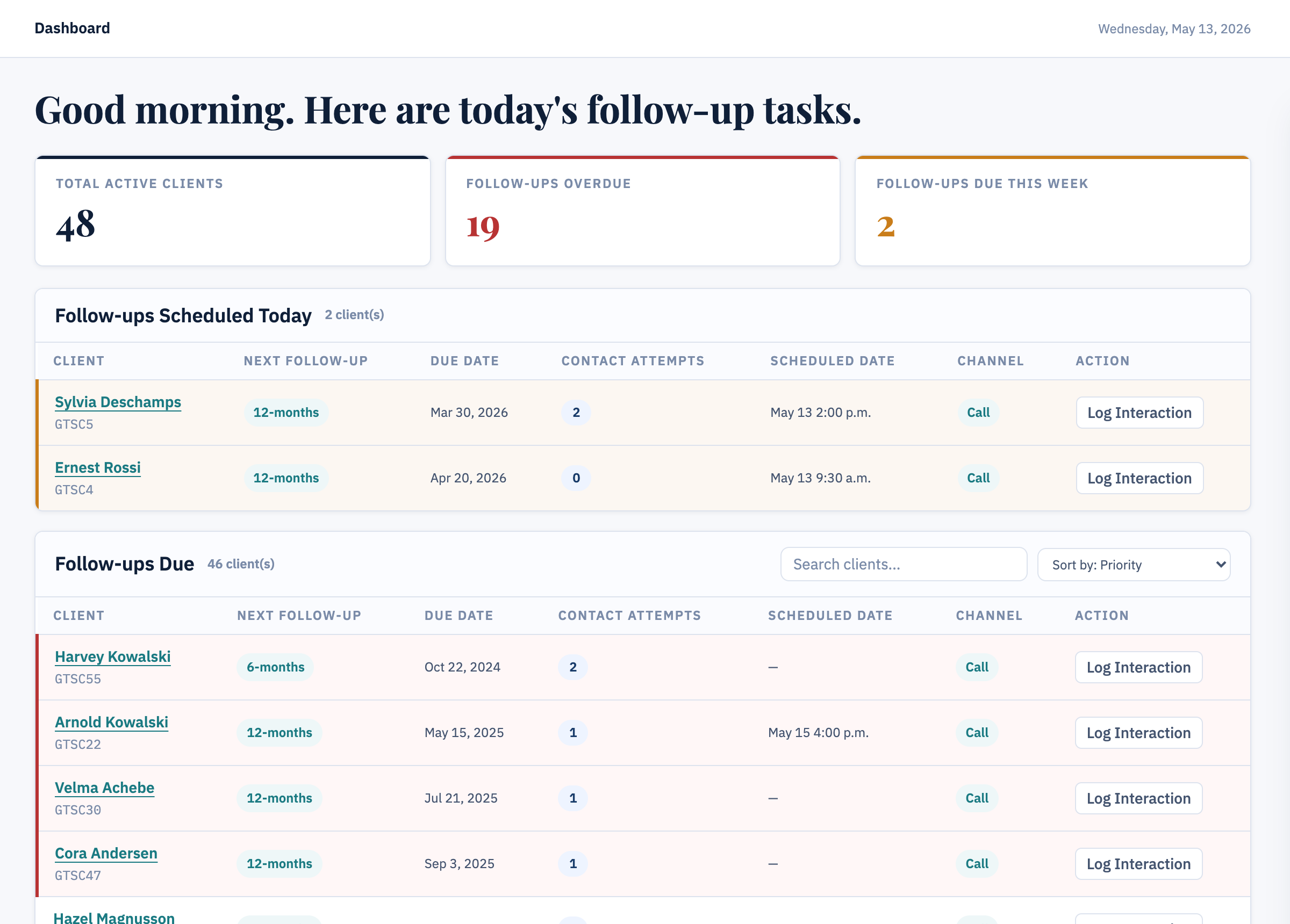
LinkLog dashboard showing priority follow-up tasks
LinkLog client profile context filter for barriers preferences programs transportation and notes
Highlight 02 — Client Profile Context Filter

Context on demand, not everything by default.

Problem: Useful client data exists, but it is not always visible or easy to scan.
Decision: Filter surfaces barriers, preferences, programs, transportation, notes, referral reason, and communication preference.
Why it matters: Client context becomes available before the call without overwhelming the profile page.
Highlight 03 — Guided Interaction Log

Structure that still keeps the story.

Problem: Follow-up forms can become checkbox-heavy and miss narrative progress.
Decision: Interaction log combines structured fields with staff notes and follow-up outcomes.
Why it matters: The system supports reporting while preserving richer service evidence.
LinkLog interaction log screen with structured fields and notes
CSV Sync / Migration

Existing templates → converter → dashboard-readable CSV.

Input

Existing Link Worker templates

Convert

AI-assisted Python script

Output

Client + interaction CSVs

Highlight 04 — Data Migration Converter

Implementation started behind the interface.

Problem: Existing Link Worker templates cannot be directly imported into LinkLog.
Decision: AI-assisted Python converter transforms existing templates into dashboard-readable CSV structures.
Why it matters: Future implementation would not require staff to start from zero or manually re-enter everything.

LIVE PROTOTYPE — HTML/CSS/JavaScript demo with CSV sample data. Prototype data is simulated.

TESTING · SPRINT-BASED EVALUATION

This was sprint-based testing, not large-scale validation.

The prototype was tested with 3 participants who had contextual familiarity in social prescribing, community coordination, and the Links2Wellbeing ecosystem.

Task 1 · Pre-call preparation Task 2 · Document a follow-up
3
sprint participants
2
core tasks tested
4
iterations shipped
BEFORE / AFTER PROOF — ONE DASHBOARD ROW
BEFORE
FOLLOW-UP LISTMAR 2026
MC Margaret Chen
Follow-up: 2026.03.15
ACTIVE
RL Robert Liu
Follow-up: 2026.03.02
ACTIVE
JP Joan Park
Follow-up: 2026.03.22
ACTIVE

One date field carried two meanings, every client looked equally urgent, and the state after a call was invisible.

AFTER
PRIORITY QUEUEMAR 2026
MC Margaret Chen
Due Mar 15 · Scheduled Mar 18
OVERDUE · 3D
RL Robert Liu
Due Mar 20 · Not scheduled yet
DUE THIS WEEK
TIMELINE STATES ✓ COMPLETED UPCOMING NO ANSWER RESCHEDULED DISCONTINUED

Due vs scheduled became separate labeled fields, urgency reads at row level, and every follow-up lands in an explicit state.

WHAT TESTING CHANGED — FOUR ITERATIONS
1Priority hierarchy

Participants could not tell which client needed attention first.

→ WHAT CHANGED

Urgency, overdue status, and due windows became scannable at row level.

2Due vs scheduled

One date carried two meanings: required follow-up and booked call.

→ WHAT CHANGED

Due date and scheduled date are now separate, labeled fields.

3Timeline states

After a call, the journey state of the client was unclear.

→ WHAT CHANGED

Completed, upcoming, no-answer, rescheduled, and discontinued states added.

4Simplified logging

Logging and profile context asked for everything at once.

→ WHAT CHANGED

Profile and interaction fields reorganized around the follow-up task.

LinkLog workflow iteration evidence
FINAL FRAME · IMPLEMENTATION AND REFLECTION
Now · 1–3 months

Pilot carefully.

Test with a small sample of 5 SALCs, validate the concept with Link Workers, and confirm minimum required data fields.

Next · 3–6 months

Train and refine.

Onboard participating SALCs, refine dashboard priority logic, and improve interaction logging and timeline states.

Later · 6+ months

Expand responsibly.

Explore deeper client insight questions and strengthen reporting continuity across SALCs and OACAO.

Final takeaway: Service design is not only about improving touchpoints. It also means designing the backstage conditions that allow a service to work: data migration, staff handoff, context preservation, and reporting continuity.

COLLABORATION NOTE · SPRINT RETRO

Peer feedback reinforced that my contribution sat between service concept and implementation: technical alternatives during ambiguity, data migration, prototype feasibility, and demo storytelling.

“Solved our huge client problem of data migration.”

  • Technical alternatives
  • Dashboard-readable CSV support
  • Unconventional solution framing
CUT TO: SCENE 03

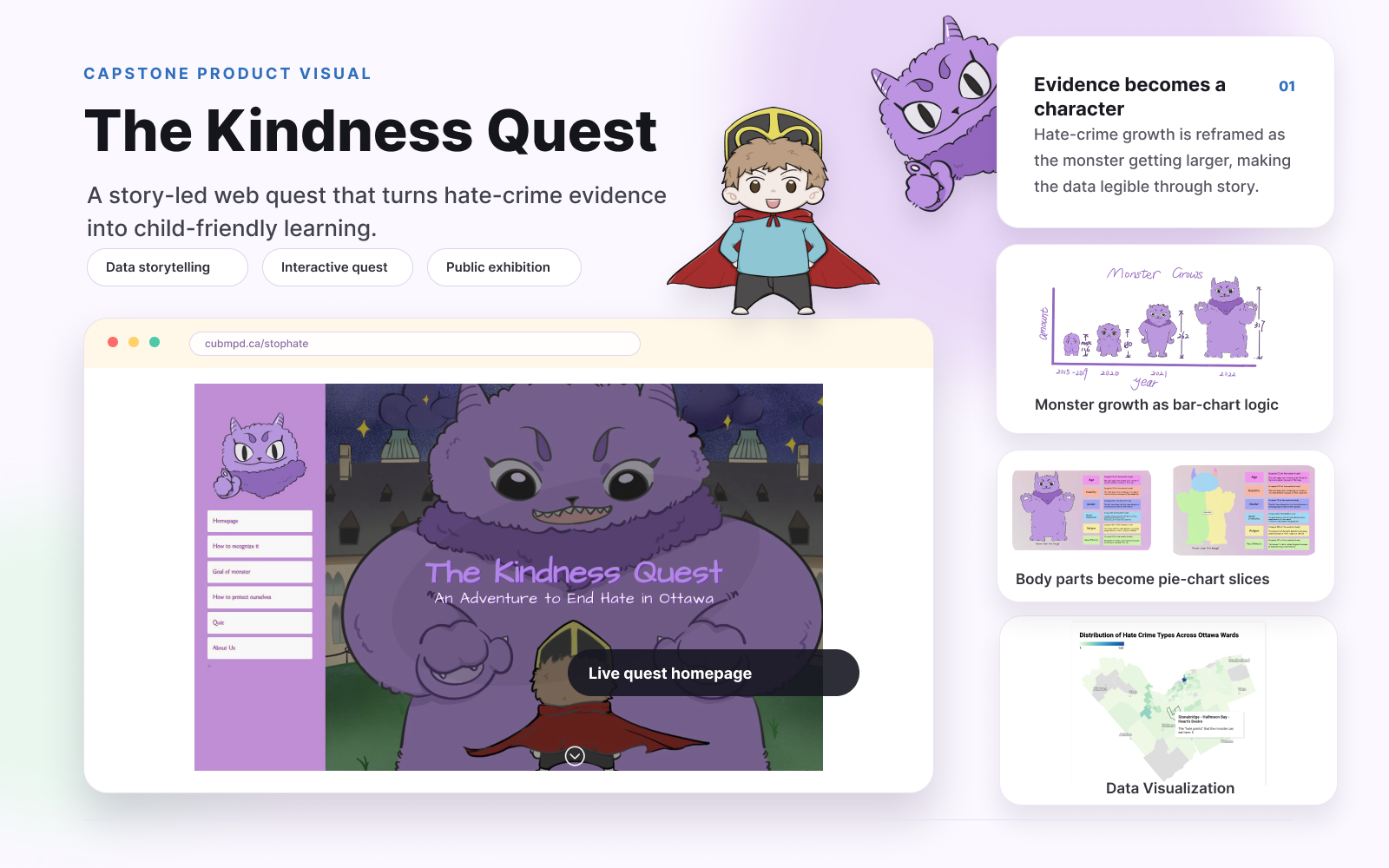
The Kindness Quest — Designing a child-friendly civic learning experience

Opening problem: how do you make a serious public-safety topic approachable for children and youth?

The Kindness Quest homepage and character-led civic learning interface